 |
 |
|
June 2006
|
issue 6.03
|
|
On Track
|
|
about this newsletter
On Track is a publication for users of Advanced Tracker solutions. Our goal is to provide news, tips, and information to help you be more productive.
- Change of Address
- Update Windows 2003 to SP1
- New Employee Tracker
- Rave Reviews for Tracker U
- Help Is Available In An Emergency
- Clocks Need Clean Power
- Absences and Employment History Hours
- Meal Voucher for Working Overtime
Information is more valuable when it is shared, so feel free to forward this newsletter to other people. See the end of this newsletter for subscription instructions.
Address Change
Some customers are still using our old postal address from 2 years ago, which has delayed service agreements, payments and Christmas cards. Please note our address is:
#800 - 15355 - 24 Avenue, Suite 494
Surrey, BC V4A 2H9
Thank you.
Windows Server 2003
Summer seems to be the time for our customers to do computer upgrades. If you are going to be upgrading your server to Windows Server 2003, you must update it to Service Pack 1. Windows 2003 original release is not compatible with our applications.
Problems with running on the original release include corrupted data, so SP1 is really important. Please pass this info to your IT people.
New Quarterly Release!
June 5, 2006 saw the most recent quarterly release of Employee Tracker. All three data platform versions are available at our download page, http://www.advancedtracker.com/download/updates.html.
Not sure if you need to update? Not everybody does, and you typically only want to update when there are certain new features or fixes that you need to apply. To find out what recent additions we've made to the software, check our release notes at http://www.advancedtracker.com/download/pdf/ETP-RelNotes.pdf
Here are a few highlights:
- The grid within the Edit Time and Attendance screen can now be set to constantly highlight the row that was last clicked on.
- The "Purge" feature can now be assigned to users, if this is permitted by a new security policy.
- Adding Time transactions via the Edit Time and Attendance screen now has the same "repeat" options available previously only when adding Absent transactions.
- The Employee Specification Buckets now allow for sorting the two employee lists by employee code or name.
- And many more...
Remember to verify your data platform and download the appropriate version of the update. If you are not sure what data platform you have, check Help, About in Employee Tracker, and look for the database information in red below the program version number and the release date. When you know which platform you have, call the Advanced Tracker tech support line at 1-888-531-3774 extension 226 and ask your tech support person for the password for the update. We password-protect the update files to prevent you from accidentally installing the wrong version.
Finally, for our SQL Server 2000 customers, when updating Employee Tracker please also update ATG, as well as Symcod.exe if applicable. This release contains some improvements in the way we connect to SQL Server, and all the programs need to use the same drivers to do so.
Advanced Tracker Training Courses Well-received
A special thank you goes out to all those who recently attended one or more of our Advanced Tracker Training Courses! We have had a lot of positive feedback from these courses as attendees continue to get even greater value from their Advanced Tracker products. Here are some excerpts:
"One of the most enjoyable courses I've ever been to. Not a waste of money like a lot of courses I've attended."
"The facilitator did a very good job in covering and highlighting important things."
"It's amazing the things Jamie could make the system do; wish I had half his knowledge of the system."
"We realized we're not using the system to its full capabilities."
For those of you who have not had a chance to attend one of these courses, keep your eyes open for an email listing the dates, locations and courses happening soon near you!
Calling Support for Emergency Help
Our Help Desk takes calls and emails for technical support during normal business hours from Monday to Friday, including most Holidays. We always attempt to get back to the customer within two hours, but there are times when this is not possible due to the volume of calls.
So what do you do if you are waiting for a call back, and you absolutely need to speak to someone right away? The answer is to call our emergency extension. Simply call 1-888-531-3774, and choose extension 505 (remember that it looks like S.O.S.!) You will be prompted to leave a message, just as if you had called our regular technical help extension (226). The difference is that the technical person on call will be paged to phone in and retrieve the recorded message, and return your call.
The next question is "what constitutes an emergency?" Obviously, we do not want our technical staff woken up several times per night to solve issues that could easily wait until the office opens. Here is the definition that is being put on our service agreements:
Emergency Definition: An Advanced Tracker Customer with current Support & Maintenance is not able to complete payroll due to an Advanced Tracker software issue or an Advanced Tracker supplied hardware issue, which cannot be resolved during business hours. Advanced Tracker will assist with hardware resolutions, however any warranties of the hardware are provided by the manufacturer. Advanced Tracker is not responsible for lack of preparedness on the part of the customer or non-related hardware or software assistance; any services deemed non-emergency will be billable.
In other words, you either a) cannot get a payroll completed because of something happening with the software, or b) you are losing data because of a problem with a clock, scanning software or retrieval software. Of course, if you feel that your situation is an emergency, even if it does not meet these criteria, use your best judgment. If the problem is going to become bigger by waiting, then it is best to call right away.
och, i canna give you more power, captain!
Power Spikes
Ever see the lights dim temporarily when a piece of equipment turns on? Or have you ever seen where lights brighten for a split second? These happen because of events called power surges, or spikes. These spikes overload the electronics in some hardware such as time clocks. These spikes quite often damage parts of time clocks leaving the owner of the clock with no automated data collection, and most often there is some data lost. Ideally, having a spare clock on hand is the way to go, but this is expensive.
A less expensive but excellent investment would be in a UPS (Uninterruptible Power Supply). This device will help you in three ways: 1) It will prevent power spikes from damaging anything that is plugged into it; 2) It will protect the devices' configuration by smoothing out drops in power (brownouts), thereby preventing undesired "reboots"; and 3) It will act as a temporary power supply in the event of a power outage.
An even less expensive alternative is a Surge Protector, which will protect against power spikes only. Since power spikes are the most common cause of electrical damage to a clock or other electronic device, this might be sufficient. Just be aware that you will not be protected from under voltage, nor will it act as a temporary power supply.
But you ask, "My computer doesn't need one of these devices, why does the clock?"
The answer is that your computer has a fairly large and robust power supply; if you ever need to replace one you'll find yourself spending about a hundred bucks. The power supplies for the time clocks are not as robust and tolerant to power spikes as your computer's power supply.
"How do I know I really need one of these?"
Ever notice your clock reboot all by itself? This is usually a symptom of power fluctuations affecting your clock; it means your clock is at risk. If you have heavy machinery that runs on electricity, or large banks of lights that are turned off and on, you may also be at risk. However, given the replacement price of clocks (not to mention the cost of lost data and the time to install a new clock), the price of a UPS or surge protector does not seem too high.
UPS power supplies and surge protectors are both affordable and easy to install, and can be purchased at most electronics shops.
Absences and Employment History
Q: If someone gets hurt on the job and must leave prior to the shift ending, we are required to pay this employee for the full shift. How do we set this up to pay him/her but not have those hours affect his/her total hours worked?
A: You can set up an absent code that allows pay times, but does not get included in employment history. These settings are on the setup screen of the absent code. Once this is set up, have the employee swipe out (or have the supervisor enter the time that the employee left) then the supervisor will need to manually add an absent record to make up the difference. So now he has a time record of 6 hours, for example. He now also has an absent record of 2 hours to make up his 8 hour day. He gets paid 8 hours; his employment history goes up 6 hours.
Meal Voucher
Q: When an employee works 2.5 hrs of Overtime according to our contract he is entitled to a $12 meal voucher and a 45 min paid break. They never take this break so we always end up tacking it on to their Overtime. How can we set this up in the system to register?
A: As long as your Overtime starts after the same amount of hours for most employees, we can solve this with a Time Lapse Premium. Go to Setup > Premiums and add a premium. Select Time Lapse and fill in the blanks as follows (given your Overtime starts after 8 hours; adjust your settings according to your conditions):
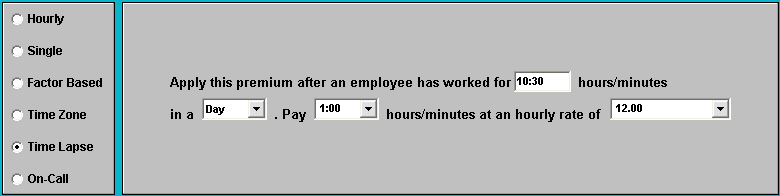
Now when an employee works 10.5 hours or more in a day, he will receive a premium record in the edit time and attendance window of $12. This premium record can have its own earning code and therefore draw from any account that it needs to.
A guy shows up late for work. The boss yells, "You should have been here at 8:30!" He replies, "Why? What happened at 8:30?"
about your On Track subscription
This newsletter was sent to ENMEMAIL. To change your email address, unsubscribe from your old address and resubscribe using your new address. See below for instructions.
Back issues of On Track are available online at www.advancedtracker.com/ontrack
To unsubscribe
If you received this newsletter in error, or no longer want to receive it, click here, or send an email to e-news@advancedtracker.com with the word remove in the subject line.
To subscribe
If someone forwarded you this newsletter and you want to start getting your own copy, click here, or send an email to e-news@advancedtracker.com with the word subscribe in the subject line.
Privacy promise: we will not sell, lend, rent, or share your email address with anyone else.
Phone us toll-free at 1-888-531-3774 (or 604-531-3774 in the BC lower mainland). Fax us at 604-535-8013.
© copyright 2006 by Advanced Tracker Technologies Inc.