 |
 |
|
April 30, 2005
|
issue 5.02
|
|
On Track
|
|
about this newsletter
On Track is a publication for users of Advanced Tracker products. Its goal is to provide news, tips, and information to help you be more productive with the products.
In this issue:
- Unlimited Support
- Quarterly Releases
- Running Services
- Windows Server 2003 Compatibility
- The Time Calculation "Blender"
- Change of Address
Information is more valuable when it is shared. Feel free to forward this newsletter to other people. See the end of this newsletter for subscription instructions.
Unlimited Support
Goodbye "Extended Software Warranties"
Hello "Unlimited Help Desk Support & Maintenance Contracts"
We are changing the way we provide support to you. Presently you subscribe to an extended software warranty that provides you with software updates as required. Help desk support has been billed as an extra, at the end of each month.
We are replacing this practice with an all inclusive, unlimited help desk support program. This means that when you call for help, you will not receive an invoice for it at the end of the month.
Our reason for the change is to provide you with hassle-free help without the ongoing billing and collection headaches we are all experiencing.
The price of the yearly support contract will increase from the current 10% of your software license, and we will be aligning your subscription to renew on June 1st or December 1st of each year. Most customers will see their overall annual support costs go down.
You will receive documentation in the mail relating to your specific situation.
We look forward to helping you more in the future.
Brother, Can You Spare a Quarter for Some Quality?
We are changing the way we provide software releases to you. Presently we release software updates on an as-needed basis. We are finding that for a variety of reasons this is not working as well as we all would like. Moving forward we will have Quarterly releases which will be available to you January 1st, April 1st, July 1st, and October 1st.
We will publish the feature enhancements and bug fixes for each release. If you decide to update your application, you will be able download the update and install it yourself. As an added bonus, our new unlimited help desk support program will provide you with remote assistance at no additional charge.
Our objective is to increase quality and customer satisfaction and decrease the bugs. We thank you for your patience and co-operation and we look forward to smoother sailing.
We will continue to issue interim updates until July 1st, after which we will move to the quarterly updates.
Now That's Service
Please share this article with your IT consultant.
The ATG and Symcod retrieval processes can now be run as Windows services. This eliminates the need to leave the server's console logged into a session with the retrieval programs running on the desktop. If you have ever lost scans because someone closed the Symcod program or logged off the console, then this will benefit you.
We recently found a utility called FireDaemon that allows virtually any program to be run as a Windows service. We tested it with ATG Retrieval and Symcod Retrieval. The retrievals started running as soon as the server was rebooted, even though we had not yet logged on.
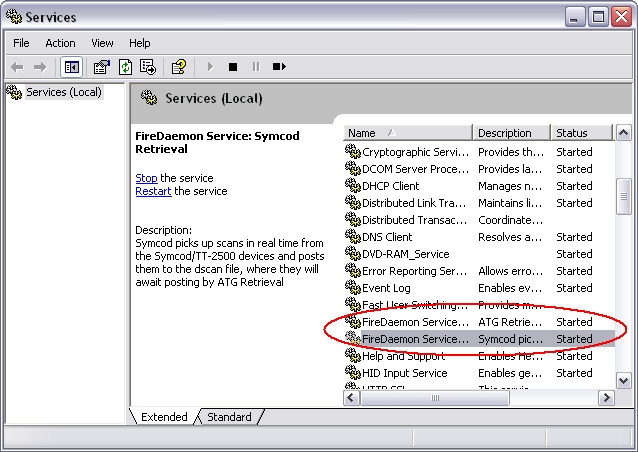
You can choose to run the retrievals invisibly in the background, or you can enable Console mode which permits you to interact with the programs as normal when you logon. This is useful if you want to see the Symcod status, for example.
FireDaemon is available from Sublime Solutions in Australia. www.firedaemon.com/
Windows Server 2003 Incompatibility
Windows Server 2003 is not compatible with Advanced Tracker applications (e.g., ATG, Symcod, Shop Retrieval). Running these programs on Windows Server 2003 will produce unpredictable results related to the processing and interpretation of dates.
Note however that is is perfectly okay to store your Advanced Tracker databases on a Windows Server 2003. That is, the MDB or SQL databases can reside on the Windows Server 2003 computer; just don't run any Advanced Tracker programs on that computer.
We recommend that you install and run our applications on an alternative computer until we correct this problem.
To install applications on a new computer you must run the Setup program, then install any updates. It is not enough simply to copy the exe from the old computer to the new one. We recommend that you contact us before you migrate your programs to a different computer.
Our programmers are working hard with Microsoft to isolate this problem and correct it. Thank you for your patience.
it slides, it dices, it even juliennes fries
The Time Calculation "Blender"
At some point every Employee Tracker user has asked herself the question, "How on earth did the program come up with that amount of payable time?" The answer is usually found in the Time Calculation Rules.
The "time calculator" in ETP is like a blender; you put a few things into the mix, and out comes something that is usually recognizable. The three primary ingredients that go into the calculator are:
- the In and Out times
- the Shift
- the Time Calculation Rule
The In and Out times are compared to the defined start and stop times of the Shift. The Time Calculation Rule specifies whether the employee is to be paid for scanning in early or scanning out late, therefore it is vital that the correct Shift be applied to the Time record. Often simply by changing the Shift, the record will recalculate as you intend.
The Rounding specification of the rule determines whether the In and Out times will be used as-is, or if they will be adjusted forward or back (usually to a 15-minute mark). Whether scan times go forward or backward depends on the grace periods specified. (A future article may explain the non-intuitive Out Grace setting.)
The Daily Deductions and Additions specification of the rule determines whether the calculator will deduct or add time to the day, based on how long the employee was on the job. Usually this is used for deducting an unpaid lunch.
The Daily and Weekly Overtime specification of the rule defines the points at which the time will go from regular to time-and-a-half to double-time. There can be some subtle interactions with other Time records, as well as Absent and Holiday records; these are enabled via the checkboxes on this screen.
Note that there is also a separate specification page for dealing with daily overtime on the weekend or a statutory holiday. Which bring up the question, "What day is it?" All of ETP's calculations are based on the Shift Date of the record, not the Worked Date. Usually the two dates will be the same, but occasionally, especially for shifts that cross midnight, the Shift Date will be different from the Worked Date. When this is the case, ETP looks at the Shift Date.
These are the main elements that determine how much time an employee will be paid for. Now you know what to look for the next time you're sleuthing an unexpected calculation.
If you have a question you'd like answered in the newsletter, send it in to support@advancedtracker.com.
Change of Mailing Address
It has been a year since we moved, and we are still getting mail at the old address. Please update your records with the following address:
Advanced Tracker Technologies Inc.
800 - 15355 - 24th Ave., Suite 494
Surrey, BC V4A 2H9
Our phone numbers remain the same:
Toll-free: 888-531-3774
Direct: 604-531-3774
Fax: 604-535-8013
about your subscription
This newsletter was sent to ENMEMAIL. To change your email address, unsubscribe from your old address and resubscribe using your new address.
Back issues of On Track are available online at www.advancedtracker.com/ontrack
To unsubscribe
If you received this newsletter in error, or no longer want to receive it, click here, or send an email to e-news@advancedtracker.com with the word remove in the subject line.
To subscribe
If someone has been forwarding you this newsletter and you want to start getting your own copy, click here, or send an email to e-news@advancedtracker.com with the word subscribe in the subject line.
Privacy promise: we will not sell, lend, rent, or share your email address with anyone else.
© copyright 2005 by Advanced Tracker Technologies Inc.